You can choose to see the film on the last page before you begin reading this document
Description of EXPLICITPASS
ExplicitPass is an app that work on iPhone e iPad and it can be identified by this icon:

Fig.5
Tapping this icon opens the only page of this simple app (Fig. 6).
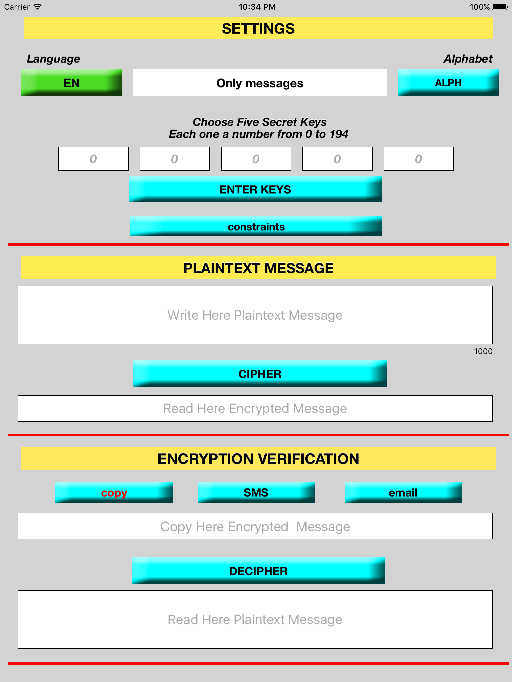
Fig.6 ExcplicitPass on iPad
In Fig. 6 we see that the screen is shared by three red lines to delineate three different functional parts. Each one is there to make it easier for the user to use the three fundamental operations of this app.
The upper part, titled SETTINGS: is needed to set ExplicitPass. It provides
1. choose the language by tapping on the green button. ENindicates English and IT indicates Italian.
2. choose the alphabet
· Alphabet 1: it
contains (for encryption purposes) only lowercase letters, uppercase letters
and numbers; this alphabet limits the value range of the keys from 0 to 62 for
a total that is slightly less than a billion (0.992 billion) key combinations
(=63x63x63x63x63)..
· Alphabet 2: it contains, in
addition to the characters of Alphabet 1,
· Alphabet 3: it further extends
· Alphabet 4: contains the same characters as alphabet 1, for a key values range from 0 to 62 and then again with a total of just under a billion combinations (0.992 billion), but with a much more robust encryption. There is also the further possibility, compared to Alphabet 1, to choose whether or not to add two special characters, the following group of twelve characters! $? # * = + -. ,; :
· Alphabet 5: it further extends the special characters set of Alphabet 4 all those of the iPhone virtual keyboard, for a range of key values from 0 to 192 for a total of about 267,78 billion of key combinations (=193x193x193x193x193).
· Only messages: In the alphabet rotation, after Alphabet 4, you see the words "Only messages", before restarting the cycle. It's a sixth alphabet that contains in addtition to the characters of Alphabet 5, the character Space and Enter. For this reason this alphabet is unusable to encrypt password, since the presence of a Space and Enter key character is generally prohibited in this case. It should be remembered that for some particularly critical access is required greater security for which you prepare as a password of the phrases consisting of several words separated by space character (called passphrase). Obviously, in such situations the use of the alphabet "Only messages" it becomes indispensable. Note that the maximum number of characters of the alphabet (195) allows to reach a total of about 281 950 000 000 of different possible encryptions of the same message in the clear (= 195x195x195x195x195). The function of the “Only messages” option is essentially to allow two or more interlocutors to exchange encrypted messages (max 1000 characters), as long as they have previously shared the same five secret keys.
You switch from one alphabet option to the next
sequentially and repeatedly simply by touching the ALPH button over and over
again. Each time you touch the ALPH button, it moves to the next option.
(Example: Alphabet
1, Alphabet 2, Alphabet 3, Alphabet 4, Alphabet 5, Only messages Alphabet 5,
Only messages, then starting again with Alphabet 1
3. choose five secret keys: in the case of Fig. 6 (only with messages configuration) the value of each key must be an integer between 0 and 194. Before turning to encryption, you must choose the five secret keys. If, for example, you choose the combination 2,2,55,2,2, one of approximately 281.95 billion possible combinations (only messages alphabet), all of the following encryption will be exclusive for the five values chosen. No other group of five values is able to generate the same encryption. After a touch on the button ENTER KEYS these values disappear from the sight of prying eyes to make way for the combination 0,0,0,0,0 (written with little sign marked), and remain hidden "in the belly" of ExplicitPass and in the minds of those that have entered them. The numbers entered are also memorized after turning off your device.
WARNING ; when you touch the button ENTER KEYS after putting in your five numbers, it always inserts the five numbers 0,0,0,0,0 and erases the previous combination. So if you touch the ENTER KEYS button when it shows the five zeros, this creates another cipher. Another basic rule in setting is to adhere strictly to the following order: First choose the alphabet and only then enter the keys. The fourth movie in the end of this document (Movie showing the encryption of a pin) exemplifies the reason for this imposition.
4. choose the "constraints" or "no constraints"; Choosing the "constraints" will reach a double objective, add to the encryption two lowercase two capital letters and two digits, constraints required by some websites, as well as generate a hash code that guarantees the integrity of the encryption. The choice of the option "constraints" with the alphabet "Only messages" offers an extra degree of protection just thanks to the presence of the hash code. In this case, indeed, they are counted failed attempts when trying to decipher a message using "quintuple" of keys chosen at random (attempts to brute force). After twenty of these attempts this decryption function is inhibited permanently. It can only be restored by reinstalling "ExplicitPass". If you reflect on the fact that a "quintuple" of keys chosen at random has one possibility of to be the right one versus 281 950 000 000 quintuple and that you can choose, randomly, only twenty keys, we can make the idea of what degree of safety has this system. With the option "no constraints" are not realized these objectives and the encrypted code has the same number of characters of the code in the clear.
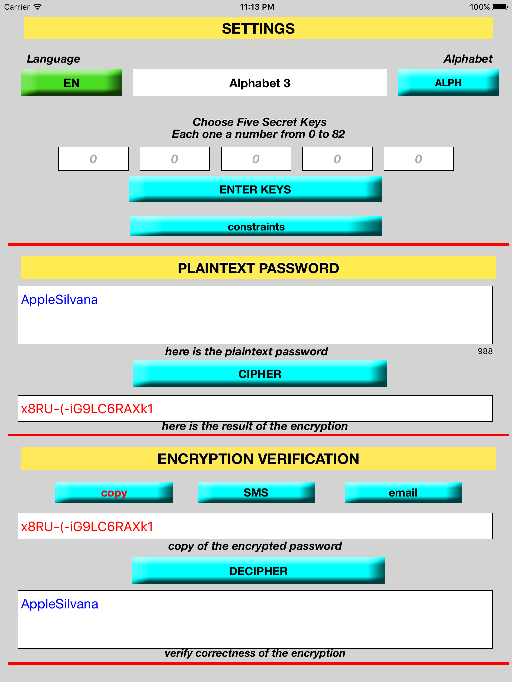
Fig.7 ExplicitPass on iPad - Touch on CIPHER -> copy -> DECIPHER
It is interesting to see, now, how to use ExplicitPass when you are asked us to upgrade our passwords, with recommended intervals from 6 months to a year.
increase by one unit the value of each of the secret keys chosen initially, maintaining always the same alphabet
In the case of example, Silvana should keep Alphabet 3 and change, with semi-annual or annual basis, from time to time, her quintuple of keys, as follows: first year 2, 2, 55, 2, 2 second year 3, 3, 56, 3, 3 third year 4, 4, 57, 4, 4 etc. It understands that it is a secret the first quintuple, of course, will are also secrets all the quintuples generated later.
In the spirit with which it was created this application, that is, having to memorize as little as possible, it is advisable to upgrade all passwords used. In this way the only thing to remember is the new quintuple, something quite trivial if you have remembered the previous quintuple. All right, you lose some half an hour to do 'this updating' of the passwords, but that, in addition to save us confusion and hardships for new recordings, will do very well to the security of all our access data.
Another important aspect of this update method is that one that allows the user to reconstruct, with absolute immediacy, password even used many years before. Suppose that Silvana is using the following secret quintuple 5, 5, 58, 5, 5, and she remember that she haven't updated for two years, an old password. It is known that to update a password the web sites also require the old password. No problem, Silvana subtracts 2 to its existing keys, get the keys 3, 3, 56, 3, 3, used two years earlier, and she can obtain, immediately, the old password of which she needs. If, then, Silvana also wants to "predict the future" to know the passwords she will have in 5 years: here are her future keys: 10, 10, 68, 10, 10.
What more could you want? All Without having to remember anything to memory!
A particular. When increasing the value of a single key exceeds the maximum value allowed by the chosen alphabet, it starts from the initial value (the sum is in fixed module). So, for example, using the Alphabet 3 which allows a maximum value of 82, year after year is realized, for that key, the sequence: ...... 79 + 1 = 80, 80 + 1 = 82, 82+ 1 = 0, 0 + 1 = 1......
With this observation, the user Silvana can then staying peaceful for 83 years !! After that she will be able to choose a new initial set of keys and repeat the trick for another 83 years. Long life to Silvana !!